How to use the PictoStick
Note
Intended Audience This document is intended for PictoStick everyday users. It also holds relevant information for Caretakers, Health Professionals and Parents of users.
Introduction
This document will show you how to use your PictoStick. The device is pre-configured to show you your activities for the entire week in the correct order. Every activity is displayed on the screen with a picture (a “picto”) and a short description.
The Buttons
The PictoStick has three buttons that you can use, as shown in the image below:
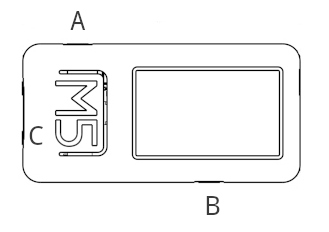
Button A (Side Button): Use this to scroll up through your activities. This is also the main power button.
Button B (Side Button): Use this to scroll down through your activities.
Button C (Large M5 Button): Press this to mark an activity as done.
Waking Up the Device
To save battery, the screen will automatically turn off after a few seconds. This is sleep mode.
To wake the device up: Briefly press Button A. The screen will light up, showing your current activity.
The Main Screen
The screen shows you everything you need to know for your day.
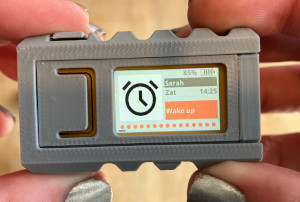
Your Name: At the very top, you will see your name.
Day and Time: Below your name, the current day of the week and the time are displayed.
Activity: The main part of the screen shows your current activity, with a large picto on the left and a description on the right.
Progress Dots: The row of circles at the bottom shows your progress for the day. Each circle is one activity. * An orange circle means the activity is not yet completed. * A green circle means the activity has been marked as done.
Battery Level: The small battery icon in the top-right corner shows how much power is left.
Marking an Activity as Done
When you finish an activity, you can mark it as complete.
Navigate to the activity you have finished.
Briefly press the large M5 Button (Button C).
The progress dot for that activity at the bottom of the screen will turn from orange to green.
If you make a mistake, you can press Button C again to change the dot back to orange.
Powering Off Completely
You do not normally need to turn the PictoStick off completely. Sleep mode is usually best for saving power. However, if you need to turn it off entirely:
To Power Off: Press and hold Button A for about 6 seconds. The screen will go blank.
To Power On: Press and hold Button A again for 6 seconds.
Note
When the device is off completely, it cannot show your activities. It’s best to let it go to sleep on its own and wake it by pressing Button A when you need it.